
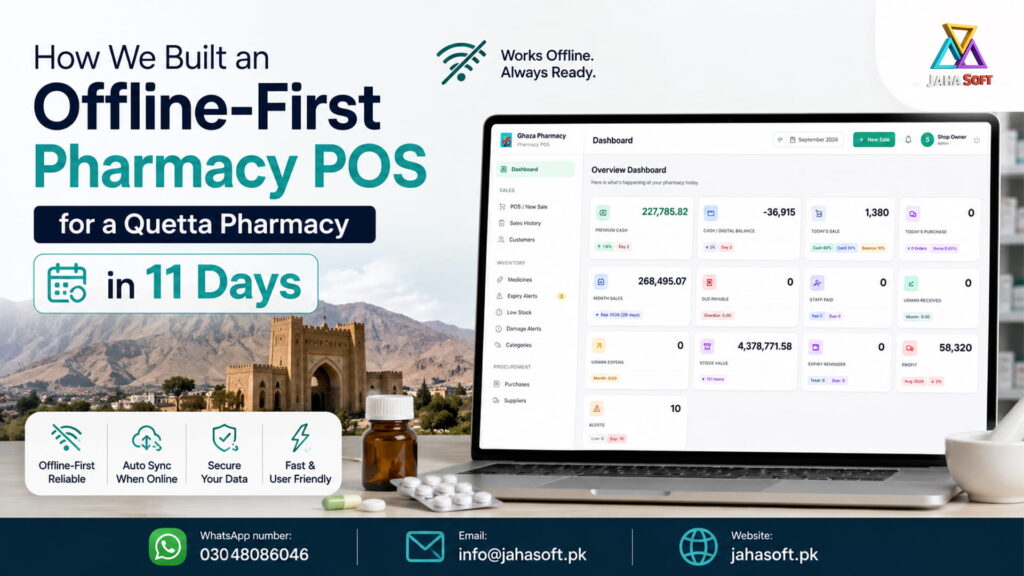
Gaza Pharmacy in Jinnah Town, Quetta now runs on a custom pharmacy management and POS system that keeps billing customers when the internet drops and when the power goes out. We designed it, built it, deployed it and trained the staff in eleven days. This post covers what we built, why we made it offline-first, how the sync actually works, and what we got wrong along the way.
If you run a pharmacy, a medical store, a distribution business or a hospital pharmacy anywhere in Pakistan, most of this applies to you too.
What we delivered, in short
- A browser-based pharmacy POS that installs to the counter PC like a desktop app
- Full billing with barcode scanning, thermal receipt printing and cash, card or credit payment
- Batch-wise inventory with expiry dates, so the system knows what is about to expire
- Customer and supplier ledgers replacing the udhaar register
- Purchase entry, supplier returns, customer refunds
- Expenses, staff records, twelve report types, role-based user accounts
- All of it working with the internet unplugged
The whole thing was fixed price and fixed scope. No hourly billing, no surprise invoice at the end.
The problem: what a Quetta pharmacy counter actually looks like
Before we start writing code we sit at the counter and watch. That hour is worth more than any requirement document.
Here is what we saw at Gaza Pharmacy. A customer walks in with a prescription. The counter staff reads the brand name, walks to the shelf, checks the strip, tells the customer the price from memory. Money changes hands. Nothing gets written down unless the customer takes credit, and then it goes into a register in Urdu shorthand that only one person can reliably read.
The stock is the bigger problem. Nobody knows what is on the shelf without walking to the shelf. Expiry dates get checked when someone remembers to check them, which in practice means when a customer complains or a distributor’s rep offers a return window. Medicines expire in the box. That is money that was already paid for and will never come back.
Then there is the udhaar. Regular customers, families with a monthly account, the clinic down the road. The register says who owes what, but reconciling it at month end takes an evening and produces an argument at least twice a year.
This is not a Gaza Pharmacy problem. Walk into any medical store in Quetta, Killa Abdullah, Loralai or Chaman and you will find some version of the same three problems: no stock visibility, no expiry control, no reliable receivables. We wrote about the same pattern in general retail when we moved Umar Noman Smart Mart from a register book to a digital khata.
Why offline-first, and why it was not optional
Here is the part most software companies get wrong when they sell to Balochistan.
A normal web application talks to a server for everything. Click “complete sale” and the browser sends a request, waits, and shows you the result. That works fine in a Karachi office with fibre. In Quetta it fails several times a day.
Load shedding takes the router down. PTCL drops for twenty minutes. A wireless ISP gets flaky when it rains. During any of that, a cloud-only POS shows you a spinner and then an error, and your counter staff go back to the paper pad. Which means the day’s sales get entered into the system later, badly, or not at all.
We have built offline-first systems before, for Murky Nexus ice factory and for a battery management business that needed to work online and offline, so we knew going in that this had to be the foundation, not a feature added at the end.
Rashid, the owner, put it more simply than we did. He said the counter cannot stop. If the software stops, the software is useless.
How the offline-first architecture actually works
Skip this section if you only care about the business outcome. If you are technical, or you are comparing vendors and want to know what to ask them, read on.
The browser holds a working copy of the data. We store the medicine catalogue, current stock, customers, suppliers and open invoices in IndexedDB, which is a real database that lives inside the browser. When the cashier searches for Panadol CF, that search hits local storage. It returns in milliseconds whether or not there is internet.
Writes go to the local queue first. Complete a sale and it is written locally and confirmed instantly. The receipt prints. The customer leaves. Only after that does the app try to push the record to the server. If there is no connection, the record sits in a sync queue and waits.
Sync runs in the background. A service worker watches the connection. The moment it comes back, queued records go up and any changes from other terminals come down. Nobody presses a sync button. Nobody thinks about it.
Conflicts resolve by device stamp and revision number. Two terminals selling the same last strip of a medicine is a real scenario. Each record carries which device wrote it and which revision it is, so the server resolves the order deterministically instead of one write silently overwriting the other.
It installs like an app. The system is a Progressive Web App. It installs to the Windows desktop, opens full screen with no browser address bar, and the counter staff never know or care that it is technically a website.
One honest caveat. Offline-first is harder to build than a normal web app, and it takes longer to test properly. If a vendor quotes you the same price for offline-first as for a standard cloud POS, ask them how the sync queue handles a conflict. The answer will tell you whether they have actually built one.
What we built, module by module
POS and billing
Barcode scan or type the generic name. The cart updates live. Walk-in customer by default, or select a registered customer for credit sales. Discount at line level or invoice level. Cash, card or credit. Enter cash received and the change calculates itself. Thermal receipt prints on 80mm.
The whole screen is keyboard driven. F2 jumps to search, F4 checks out, Escape closes. A trained cashier completes a scanned sale in under ten seconds, which matters more than it sounds when there are six people waiting.
Batch-wise inventory
This is the part that separates pharmacy software from ordinary POS and inventory systems.
A general store tracks products. A pharmacy has to track batches. The same medicine arrives from the distributor in different batches with different expiry dates and sometimes different trade prices. If your software only knows “Augmentin 625, quantity 40,” it cannot tell you that 12 of those expire next month.
So every stock line carries batch number, manufacturing date, expiry date, purchase price and sale price. The dashboard shows an expiry alert box. The system suggests the earliest-expiring batch first when a medicine is sold, which is the FEFO principle, and it keeps expired and damaged stock in a separate register so it never gets billed by accident.
Medicines master
SKU or barcode, brand name, generic name, manufacturer, category, formulation, strength, pack size, sale unit, purchase price, retail price, trade price, low stock threshold. The generic name field earns its place daily. When a brand is out of stock the staff can search the formula and offer a substitute instead of losing the sale.
Purchase and supplier ledger
Enter the distributor’s invoice once. Add as many batch rows as the invoice has. Record what was paid and what is still owed. One save updates stock, expiry dates, selling prices and the supplier’s balance together. Supplier returns reverse all of it cleanly.
Customer ledger
Every credit customer has a profile with a credit limit and a running balance in both directions, since sometimes the pharmacy owes the customer. Statements print on demand. The register still exists in a drawer somewhere, but nobody opens it now.
Reports
Daily sales and cash position, profit after cost of goods and expenses, stock valuation, expiry, low stock and reorder, purchase by supplier, receivables ageing, top and slow movers. Everything filters by date range and exports to PDF or Excel. If you want the accounting side to go further, that connects naturally to what we build for accounting software clients in Quetta.
Users, roles and settings
Owner, manager and cashier roles with per-module permissions. An activity trail showing who sold, edited or deleted what. Shop profile, invoice numbering, tax defaults, printer setup and automated daily backup.
Why eleven days was possible
Eleven days is fast, and it is only possible because we were not inventing the domain from scratch. We have shipped POS and inventory work for general stores, for hardware and sanitary shops, for small businesses across Quetta, and healthcare work including blood bank software. The batch, ledger and sync patterns are ours already. What changes per client is the domain logic on top.
What was hard
Two things, if I am being straight about it.
Thermal printing from a browser. Getting consistent 80mm ESC-POS output across different printer models is fiddlier than any part of the business logic. We ended up building a print profile per printer type and testing on the client’s actual hardware rather than trusting a spec sheet.
Data import. The existing medicine list came as a mix of an Excel file and handwritten pages. Cleaning it was a day of work that no timeline estimate ever accounts for properly. If you are planning a project like this, get your product list into a spreadsheet before development starts. It will save you a day and save your vendor an argument.
What changed at the counter
Rashid can open the dashboard in the morning and see yesterday’s sales, current stock value, what customers owe him, what he owes distributors, and what expires this month. That took him an evening with a calculator before.
The expiry alerts are the part that pays for the software. One box of a slow-moving antibiotic caught before expiry covers a meaningful chunk of the build cost.
What this costs and who it is for
This build was fixed price at PKR 100,000, including one year of hosting and domain, deployment, data import, staff training and thirty days of post-delivery support. Scope decides price, so a hospital pharmacy with multiple counters and a store issue workflow costs more than a single-counter medical store. Our general pricing thinking is laid out in how much a website costs in Quetta, and the same logic applies to software.
This kind of system fits:
- Retail pharmacies and medical stores
- Hospital and clinic pharmacies, alongside hospital web systems
- Pharmaceutical distributors and wholesalers
- Surgical and medical equipment suppliers
- Clinics that dispense as well as consult, which pairs with medical website design and development
If you are still deciding between vendors, we wrote an honest checklist on how to choose a software house in Quetta. Use it on us too.
Get software built for your pharmacy, medical store or hospital
If you run a medicine business, a pharmaceutical distribution company or a hospital pharmacy and you want software built around how you actually work rather than a template you have to work around, talk to us. We will look at your counter, your stock and your ledger, and tell you honestly what it takes.
Email: Info@jahasoft.pk
Phone / WhatsApp: +92 304 8086046
Office: JahaSoft, Quetta, Balochistan
JahaSoft Ltd (UK) | JahaSoft (SMC-Private) Limited (Pakistan) | JahaSoft LLC (USA)
Offline-first pharmacy software stores your data inside the computer at the counter and treats the internet as optional. Billing, stock lookup and receipt printing work with the connection down. When the internet returns, the software syncs everything to the server automatically without anyone pressing a button.
Yes. A properly built offline-first system runs entirely from a local database in the browser. Gaza Pharmacy bills customers during load shedding and ISP outages, and the records upload on their own once connectivity is back.
Yes. Every stock entry carries a batch number, manufacturing date and expiry date. The dashboard shows expired and near-expiry batches, and the POS suggests the earliest-expiring batch first so old stock sells before new stock.
Any standard USB or Bluetooth barcode scanner in keyboard-wedge mode works with no setup. Thermal printers in 58mm and 80mm are supported, and we configure the print profile against your actual printer during deployment.
Yes. Multiple terminals sync to the same server, and each record carries a device stamp so simultaneous edits resolve correctly. Multi-branch pharmacies with separate stock per location are a bigger scope and quoted separately.