
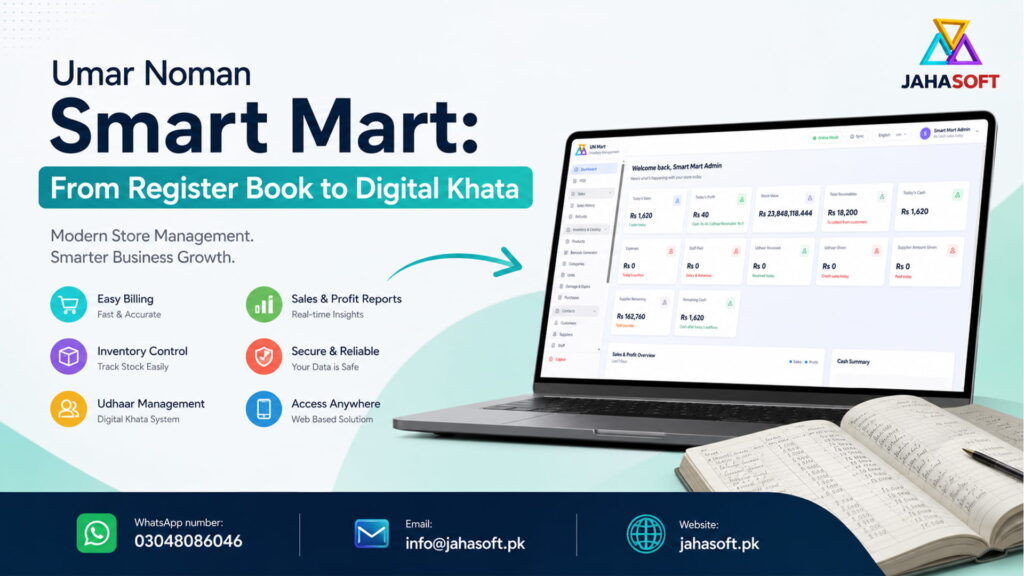
Every general store in Pakistan runs on two systems at once. There is the stock on the shelves, and there is the register under the counter. The shelves are usually fine. The register is where the money quietly goes missing.
Umar Noman Smart Mart is a general store that had outgrown its register. Enough daily footfall that the counter got busy, enough regular customers buying on udhaar that the credit page ran into columns of names, and enough suppliers that nobody could say from memory who was owed what. The owner could tell you the shop was doing well. He could not tell you, at 9pm on a Tuesday, exactly how well.
That gap is the reason this project existed. Here is what we built, how long it took, and what actually changed at the counter.
The problem was never the billing
When a shopkeeper says he wants “software,” he usually means he wants a faster bill. That is the visible pain. Somebody is standing at the counter with fourteen items and the person behind the till is writing prices on a slip.
But billing speed was the smallest part of what Umar Noman Smart Mart needed. Sitting with the owner and going through a month of register pages, four bigger problems came out.
Nobody knew the real profit. The register recorded sales. It did not record cost. So a day’s total might read PKR 85,000 in sales, and that number tells you almost nothing, because a day heavy on cigarettes and cold drinks earns very differently from a day heavy on rice and ghee. Profit was a feeling, not a figure.
Udhaar had no memory. Credit sales were written on a page under a customer’s name. When the customer paid something back, that got written too, usually. When a page filled up, the balance got carried forward by hand. Every carry-forward is a chance for a mistake, and every mistake in that direction costs the shop money. Nobody argues with a balance that came out too low.
Expiry was found, not tracked. Damaged and expired stock got discovered when a customer pointed at a date on a packet. By then the loss was already taken.
Stock value was a guess. Ask what the shop was holding in inventory and the answer was a range, not a number. That matters when you are deciding how much to reinvest and how much you can safely pull out.
None of those get fixed by a faster bill. They get fixed by a system that records cost, credit, and stock movement at the same moment the sale happens.
Why offline first, and why it is not optional in Quetta
We build a lot of things as web applications. For this one, the first architecture decision was the most important, and it was not really a technical decision at all. It was about what happens on a bad day.
A general store cannot stop billing. If the internet drops during evening rush and the software stops responding, the shop has to go back to slips of paper, and every one of those slips has to be entered again later. That happens twice and the staff stop trusting the system. Once staff stop trusting the system, they stop using it properly, and the data goes bad. A half-used POS is worse than no POS, because now you have wrong numbers instead of no numbers.
So the application was built offline first. In practice that means the billing machine holds its own copy of the data. A sale is written locally and confirmed instantly. Nothing waits on a network round trip. When connectivity comes back, a background service pushes the local records to the server and pulls down anything that changed elsewhere. Each transaction carries a unique identifier, so reconnecting never produces a duplicate invoice or a gap in the invoice numbers.
The counter screen shows the sync state at all times, so staff can see whether the machine is online, offline, or catching up. That indicator matters more than it sounds like it should. People trust a system that tells them what it is doing.
The application installs as a PWA, which means it runs from the browser on the billing computer but behaves like an installed program, with its own icon and its own local storage. No separate desktop installer, no license file, and it opens the same way on a second machine or a phone if the owner wants to check the day’s figures from home.
What we built
The full system went live at unsmartmart.com. These are the parts that carry the daily load.
A dashboard that answers the 9pm question
The owner’s real question at closing is not “what were sales.” It is a set of related questions that only make sense together. So the dashboard shows today’s total sale, today’s profit split between cash and udhaar, total stock value, total receivables, cash collected, expenses paid, udhaar given out, udhaar recovered, amounts paid to suppliers, the outstanding supplier balance, and closing cash in hand.
Put those on one screen and the shop becomes legible. You can see a day where sales looked strong but profit was thin, or a day where the cash drawer looks light only because a large supplier payment went out. Any past date can be pulled up the same way.
Billing built for a scanner, not a mouse
The POS screen is driven from the keyboard and the barcode scanner. A full transaction can be completed without touching the mouse, which is the only way a POS survives peak hours.
It handles walk-in customers and registered account customers, product search by name or SKU or barcode, line-level and bill-level discounts, cash received with automatic change calculation, and payment as cash, as udhaar, or split between the two. Bills can be parked and recalled, so a customer who has gone back to the aisle for one more thing does not block the counter. Receipts print to a thermal printer with the store header and the customer’s running balance on the slip.
That last detail does more work than anything else in the module. When a customer’s outstanding balance is printed on the receipt in front of him, the conversation about recovery happens on its own.
Units that match how a store actually buys and sells
This is where most general store software falls over. The shop buys a carton, breaks it into boxes, and sells single pieces. If the software cannot hold all three at once, the stock count drifts within a week and nobody trusts it again.
Each product carries a base unit and its conversion levels, so a carton of twelve boxes of twelve pieces is one product with three usable units. Purchase entry can be in cartons, the sale can be in pieces, and the stock stays correct in the base unit throughout. Loose goods work the same way with kilograms and grams.
Customer and supplier ledgers, which is where the money was hiding
Every customer has an account with an opening balance and a running ledger of sales, receipts, and returns. Every supplier has the mirror image with purchases, payments, and returns. Recoveries and payments are recorded with a date and a note, and either party’s statement can be printed for a date range.
The printed statement changed collection behaviour at this shop more than any other feature. Handing a customer a printed page with dates and amounts is a completely different conversation from reading numbers off a register.
Purchases with real costing
Purchase entry captures the supplier, product, cost, quantity, unit, discount, bonus quantity, manufacturing date, and expiry date. Bonus stock gets absorbed into the effective per unit cost, which is the only way profit figures stay honest. A supplier who gives eleven cartons for the price of ten has changed your cost per piece, and software that ignores that will overstate your margin on every sale of that item.
Expiry and damage as a tracked event
Near expiry stock shows up on a list before it becomes a loss. Damaged goods are recorded with quantity, reason, and date, and the value comes out of stock and lands in the accounts where it belongs. Losses that are recorded get managed. Losses that are discovered just get absorbed.
Reports, users, and settings
Reports cover products, customers, and suppliers, each filterable by date and exportable to Excel or PDF. Users have roles, so a cashier can bill without being able to change prices, delete invoices, or open the profit reports. Settings hold the store profile, receipt header and footer, printer width, and the low stock thresholds.
Fourteen days, start to finish
The project ran two weeks, and the shape of it looked like this.
The first two days were requirement freeze and data collection. This is the part clients underestimate and it is the part that decides whether you finish on time. We needed the product catalogue with cost and sale prices, opening stock, and the opening balances for every customer and supplier. That data existed, but it existed in a register, and getting it into a spreadsheet was the single largest task the client had to do.
Days three to seven were the core build: the POS engine, the offline data layer and sync service, products, categories, units and conversions, and purchase and stock movement.
Days eight to eleven covered the ledgers, udhaar receipts and payments, refunds, damage and expiry, expenses, accounting, the dashboard, and the report suite.
Day twelve was hardware and quality assurance. Barcode scanner, thermal printer, and deliberate offline testing, which means pulling the internet out mid transaction and watching what the system does.
Day thirteen was deployment to the live domain and loading the opening data. Day fourteen was on site installation at the counter, staff training, and handover, with thirty days of free support starting from that day.
What actually changed at the shop
The honest answer is that the first week after go live is always the hardest week. Staff are slower on the new screen than they were with a pen. That is normal and it passes in a few days, but anyone who tells you the change is instant has not done many of these.
What changed after that first week is easier to describe. Closing the day became a two minute job instead of a reconstruction exercise. The owner could see profit rather than turnover. Udhaar stopped being a page of names and became an account per customer with a printable statement, which meant recovery conversations started happening on a schedule instead of when somebody remembered.
The one that surprised the owner was stock value. Seeing the actual number sitting on the shelves, updated live, changes how you think about reordering. Money tied up in slow moving stock is invisible in a register. It is unavoidable on a dashboard.
What this costs, and who it suits
The build described here was delivered as a fixed price project, with hosting and domain registration for the first year included, plus training and thirty days of free support after go live. Pricing depends on scope, but a general store system in this shape sits in a range most independent shop owners can justify against a single month of the losses it prevents.
It suits you if you are running a general store, kiryana, or mart with regular udhaar customers, more than one supplier you owe money to, and a stock count you cannot state confidently. It suits you less if you are a single counter shop with almost no credit sales and under a hundred products, where a simple billing app is honestly enough and I would say so.
Get your store on the same system
If you are running a mart, general store, or kiryana on paper and you want the same setup, we build these for shops across Pakistan and we start by looking at how your shop actually works rather than selling you a package.
Talk to us directly:
Email: Info@jahasoft.pk
Phone / WhatsApp: +92 3048086046
Send a message with your shop name, roughly how many products you carry, and whether you sell on udhaar. That is enough for us to tell you what your build would involve.
It is billing software that stores data on the shop’s own computer first and syncs to the server afterwards. Sales, purchases, and payments all continue working with the internet down, and the system uploads everything automatically once the connection returns. Ordinary cloud POS software stops working the moment the connection drops.
Yes, and it is one of the main reasons the system exists. Each customer has an account with an opening balance and a full ledger of sales, credit given, and recoveries. The current balance prints on the receipt, and a dated statement can be printed for any period.
Yes. It supports standard USB and keyboard wedge barcode scanners, and ESC/POS thermal printers in both 58mm and 80mm widths. Receipt header, footer, and paper width are set in the software.
Yes. Multiple users can work on separate machines on the same network, each with their own login and role. A cashier can be restricted from changing prices, deleting invoices, or viewing profit reports.
Yes. The data belongs to the store. It sits on your own server and domain, and it is not shared with anyone.